If you're building AI applications that need to understand, classify, or retrieve information from PDFs and other unstructured documents, one of your first decisions is how to get that content into a format your models can work with. The space has matured rapidly, and you now have a genuine choice between running Python libraries locally and sending documents to cloud-based parsing services. Neither option is universally better — the right pick depends on how much control you need, how many documents you're processing, and what kind of content you're dealing with.
This post walks through the leading options in both categories and offers a framework for choosing between them.
Python Libraries for Local Document Parsing
Running a parsing library in your own environment gives you full control over the pipeline. You can customize extraction logic, handle edge cases with your own code, keep sensitive documents off third-party servers, and avoid per-page API costs. The tradeoff is that you're responsible for infrastructure, GPU provisioning (if applicable), and staying current with updates. Here are the most capable options available today.
Marker
Marker, developed by Datalab, is arguably the most full-featured open-source document-to-markdown converter available. It converts PDF, DOCX, PPTX, XLSX, HTML, EPUB, and image files into clean Markdown, JSON, or HTML output. Under the hood it runs a pipeline of deep learning models: it detects page layout and reading order with Surya, applies OCR when needed, formats tables and equations, extracts images, and strips out headers, footers, and other artifacts. Marker handles inline math (converting to LaTeX), code blocks, footnotes, and multi-column layouts out of the box.
What sets Marker apart from lighter-weight tools is its hybrid mode. By passing a --use_llm flag, you can route ambiguous blocks through a language model (Gemini, Ollama, Claude, or OpenAI) for additional cleanup — merging tables across pages, correcting OCR errors, and formatting forms. Marker's benchmarks show it outperforming LlamaParse, Mathpix, and Docling on both heuristic and LLM-judged accuracy scores across scientific papers, financial documents, legal documents, and more. On an H100 GPU it can sustain roughly 25 pages per second in batch mode. It also supports custom processors and renderers, so you can slot your own formatting logic into the pipeline without forking the codebase. The open-source license is a modified Open Rail-M (free for research and small startups), with a commercial option available through Datalab's hosted API and on-prem offering.
pypdf
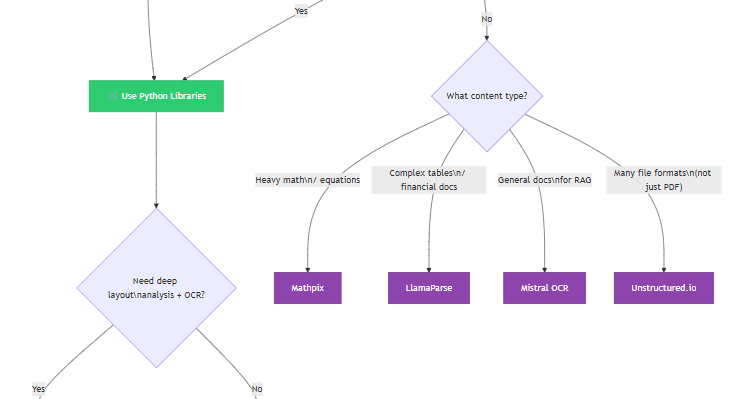
If you don't need deep layout analysis or OCR, pypdf is a pure-Python library that handles the mechanical side of working with PDFs: splitting, merging, cropping, rotating, encrypting, and extracting text and metadata. It has no external dependencies (aside from optional crypto libraries), installs in seconds, and works everywhere Python runs. The text extraction is straightforward — you get the characters embedded in the PDF, page by page — but it won't reconstruct tables, handle scanned documents, or deal with complex layouts. Think of pypdf as a utility knife rather than a full parsing engine. It is extremely useful for pre-processing steps like splitting a large PDF into individual pages before feeding them to a more sophisticated parser, or for extracting metadata and table-of-contents information to use as classification signals.
pdfplumber
pdfplumber sits in between pypdf's simplicity and Marker's deep-learning approach. Built on top of pdfminer.six, it gives you fine-grained access to every character, line, rectangle, and curve on a PDF page, along with their exact coordinates and styling attributes. Its standout feature is table extraction: it detects table boundaries by analyzing the alignment of graphical lines and text positions, then reconstructs the cell contents in a structured format. You can tune the extraction with detailed settings for line snapping, intersection tolerance, and edge detection. It also includes visual debugging tools that let you overlay detected elements on the rendered page, which is invaluable when you're trying to understand why a tricky table isn't extracting correctly. The limitation is that pdfplumber only works on machine-generated (digitally native) PDFs — it doesn't do OCR. For scanned documents, you'd pair it with an OCR tool upstream.
PyMuPDF (fitz)
PyMuPDF is a Python binding for the MuPDF rendering engine, and it is significantly faster than pdfminer-based tools for raw text extraction and page rendering. It can extract text, images, and metadata, render pages to images at arbitrary resolution, and manipulate PDF structure (merging, splitting, redacting, annotating). Many teams use PyMuPDF as the fast extraction layer in a larger pipeline — for example, rendering each page to an image and then passing those images to a vision model or OCR engine. The library requires a compiled C dependency (MuPDF itself), so it's not pure Python, but wheels are available for all major platforms. Note that PyMuPDF is dual-licensed under AGPL and a commercial license from Artifex, so check the licensing implications if you're distributing software that includes it.
Docling
Docling, developed by IBM Research and hosted under the LF AI & Data Foundation, is a newer entrant that has gained traction quickly. It parses PDF, DOCX, PPTX, XLSX, HTML, images, and even audio files (via automatic speech recognition) into a unified DoclingDocument representation, which you can then export to Markdown, HTML, or JSON. Its PDF understanding pipeline includes page layout detection, reading order analysis, table structure recognition, formula parsing, and image classification. Docling also supports visual language models (via its GraniteDocling integration) for enhanced understanding, and it offers plug-and-play integrations with LangChain, LlamaIndex, CrewAI, and Haystack. Like Marker, it runs locally and handles air-gapped environments, but it takes a somewhat different architectural approach — focusing on a unified document representation format that works across many input types. The codebase is MIT-licensed, making it one of the most permissively licensed options in this category.
Online Services and APIs
Cloud-based parsing services trade local control for convenience and scale. You send a document to an API endpoint and get back structured output — usually Markdown or JSON — without managing GPU infrastructure or model versions. The best services also tend to invest heavily in accuracy on edge cases (rotated pages, handwritten annotations, deeply nested tables) because that's their competitive moat. The costs are per-page or per-token, which makes them expensive at very high volume but very cheap to get started with.
Mistral OCR
Mistral OCR, launched in early 2025, is a vision-model-powered parsing service that outputs clean Markdown from PDFs. It handles images, figures, and multilingual content natively, and its output is designed to be fed directly into LLMs for retrieval-augmented generation. The API follows a pay-per-page/token model. If your use case is primarily about getting PDF content into a format that a language model can reason over, Mistral OCR is one of the most straightforward options available — the output quality is high and the integration surface is small.
Mathpix
Mathpix has long been considered the gold standard for scientific and technical document parsing. It specializes in converting complex mathematical equations, chemical diagrams, and handwritten notation into LaTeX and Markdown with very high fidelity. If you're working with academic papers, STEM textbooks, or any document heavy on formulas, Mathpix's accuracy on those elements is difficult to match with general-purpose tools. It offers a generous free tier and then per-PDF or subscription pricing.
LlamaParse
LlamaParse, developed by the LlamaIndex team, is a proprietary parsing service built to solve the notoriously difficult problem of extracting structured tables from PDFs for use in RAG pipelines. It uses its own parsing models (not just a wrapper around Tesseract or pdfminer) and integrates directly with the LlamaIndex framework for downstream retrieval. Its strength is reconstructing complex tables — especially the kind found in financial reports — into well-structured Markdown or JSON. LlamaParse offers a free daily page limit (roughly 1,000 pages) and paid plans beyond that.
Upstage Document Parse
Upstage offers a specialized Document Parse API known for high-performance layout analysis. It excels at understanding the logical structure of documents — identifying headers, footers, sidebars, multi-column layouts, and mixed content areas — and converting that structure into clean HTML or Markdown. If you're dealing with documents that have unusual or mixed layouts (reports with images interspersed in multi-column text, for instance), Upstage's layout model tends to handle them well.
Unstructured.io
Unstructured.io positions itself as an ETL platform for LLMs. Beyond PDF parsing, it ingests dozens of formats — PowerPoint, HTML, email, Word documents, and more — and normalizes them all for AI consumption. The serverless API handles chunking and partitioning strategies out of the box, which is useful if you're building a pipeline that needs to process many different file types at scale without writing custom ingestion logic for each one. It's less specialized than the tools above on any single format, but the breadth of format support is its main advantage.
Enterprise Cloud Options
If you're already invested in a major cloud ecosystem, both Azure and Google have recently upgraded their document AI capabilities. Azure AI Document Intelligence now includes a Layout model that outputs Markdown directly, preserving headings and table structure with high reliability at enterprise scale. Google Cloud Document AI offers powerful OCR and structural analysis, though getting clean Markdown output typically requires more post-processing than the native Markdown tools listed above. These are good choices when you need deep integration with the rest of your cloud infrastructure and want to keep everything within a single vendor's ecosystem.
How to Choose: Libraries vs. Services
The decision between a local library and an online service isn't binary — many production systems use both. But here are the factors that should guide your default choice.
Lean toward Python libraries when: you need fine-grained control over the parsing logic (custom processors, block-level manipulation, domain-specific heuristics); you're handling sensitive or regulated documents that can't leave your environment; you want to avoid per-page costs as your volume grows; or you have GPU infrastructure available and want the highest possible throughput. Tools like Marker and Docling give you the accuracy of cloud services with the flexibility of local code, and their hybrid LLM modes let you selectively apply expensive model calls only where they're needed.
Lean toward online services when: you're processing high volumes and want to avoid managing GPU infrastructure; you need to get started quickly without worrying about model versions, dependencies, or hardware; your documents contain specialized content (like dense math or deeply nested tables) where a service has a clear accuracy advantage; or your team doesn't have the ML engineering bandwidth to maintain a local parsing pipeline. The per-page cost of services like LlamaParse, Mistral OCR, or Mathpix is quite reasonable at moderate scale, and the operational simplicity can be worth the cost.
In practice, many teams start with an online service to validate their pipeline design, then migrate the parsing step to a local library like Marker or Docling once they've proven the concept and want to optimize for cost and control. Others keep a service like Mathpix in the loop specifically for math-heavy content while running everything else through a local tool. The ecosystem is flexible enough to support either approach, and the quality gap between the best open-source libraries and the best cloud services has narrowed significantly over the past year.